A desk with two monitors can provide a very different working experience from a single-screen setup. Instead of repeatedly switching between windows, users can keep several applications visible at the same time. A document can stay open on one screen while email, research, communication tools, spreadsheets, or creative software remain visible on the other.
The challenge is that two monitors also require more desk space.
Each monitor normally comes with its own stand, and those stands can take up a significant portion of the usable surface. On smaller desks, this can leave less room for a keyboard, mouse, notebook, speakers, or other everyday equipment.
A dual monitor stand provides another way to organize the workspace. Rather than keeping two separate monitor bases on the desktop, the displays are supported by a shared mounting system. This can free up part of the desk while also providing options for positioning and adjusting the screens.
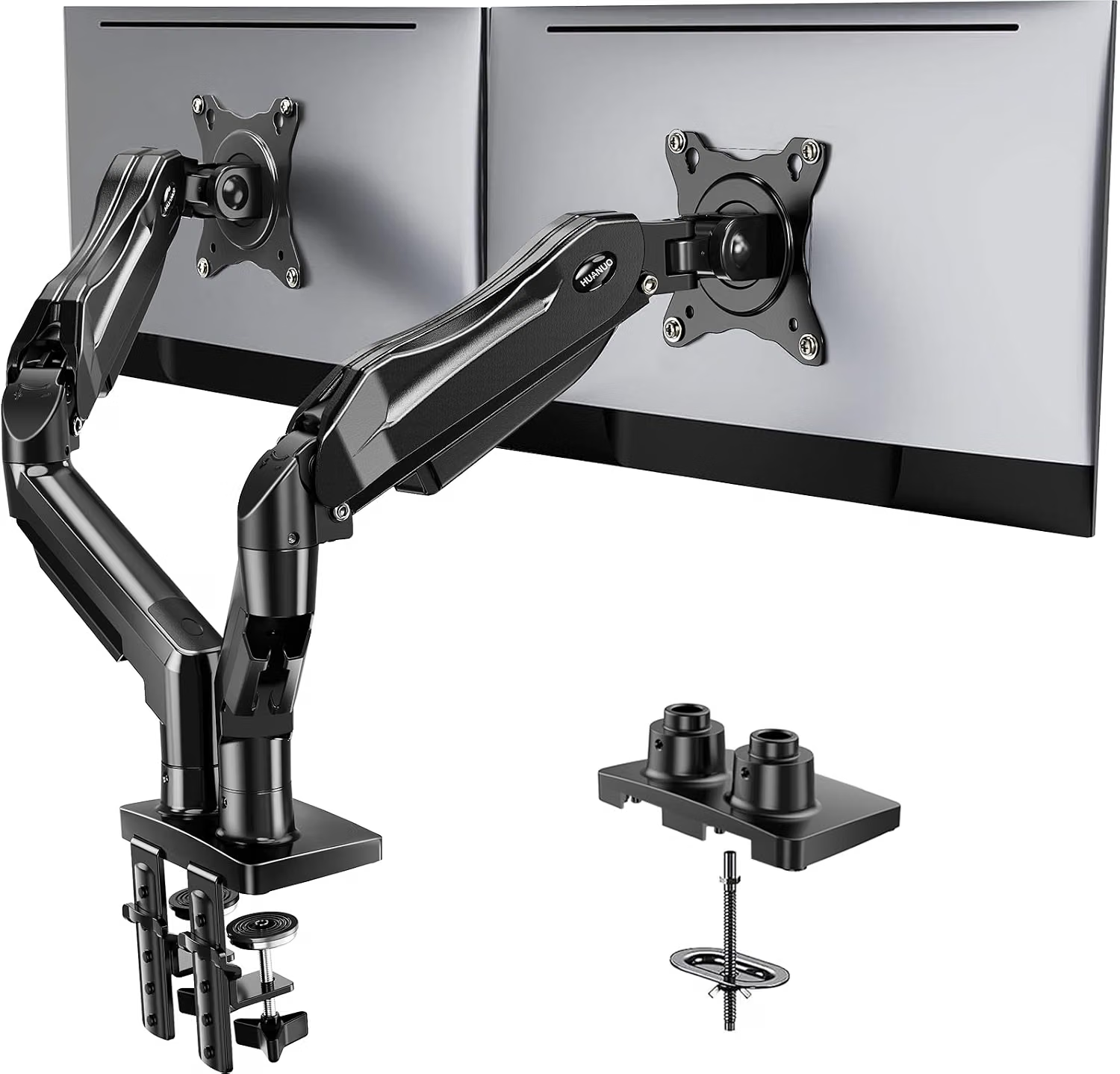
The HUANUO Dual Monitor Stand is designed for users who want to mount two monitors on one stand and adjust their positioning around the workstation. Its design is intended for compatible displays and desks, making it relevant to home offices, gaming setups, study spaces, trading workstations, creative environments, and professional desks.
A monitor stand is not simply about raising a screen. Its real usefulness comes from how it changes the relationship between the monitors and the person using them. Height, viewing distance, tilt, rotation, and screen alignment can all affect how a workspace feels during long periods of computer use.
At the same time, monitor stands have important installation requirements. The monitor’s mounting pattern, weight, size, desk construction, and available space all need to be considered before installation.
This guide explores the HUANUO dual monitor stand, its general functionality, potential applications, installation considerations, and how it compares with other monitor-support categories.
What Is a Dual Monitor Stand?
A dual monitor stand is a mounting system designed to hold two displays from a shared support structure.
Instead of using the original stand supplied with each monitor, compatible displays are attached to the monitor stand using their VESA mounting points.
The stand then supports both monitors from a central base or mounting mechanism.
This approach can provide several practical advantages.
First, it can reduce the amount of desk surface occupied by monitor bases. Second, it can make screen positioning more flexible. Third, it can create a more consistent arrangement between two monitors.
For example, both screens can be positioned at approximately the same height, angled toward the user, or arranged with one display slightly offset from the other.
The exact range of adjustment depends on the stand’s construction and the monitor configuration.
Key Features
Dual-Monitor Support
The central function of the HUANUO stand is its ability to support two monitors.
A dual-monitor arrangement can be useful for many types of computer work.
A professional might use one screen for a primary application and the other for communication or reference material.
A student can keep research material open on one screen while writing on the other.
A developer can place code on one display and documentation, testing tools, or terminal windows on another.
A gamer or streamer can use one monitor for gameplay and another for chat, streaming controls, recording software, or other supporting applications.
The usefulness of two screens depends on the user’s workflow, but the physical arrangement plays an important role in making the setup comfortable.
Adjustable Monitor Positioning
One of the main reasons people choose a monitor arm or stand instead of the original monitor bases is adjustability.
A suitable dual monitor stand can allow the screens to be repositioned rather than forcing the user to work around fixed monitor stands.
Depending on the adjustment mechanism, users may be able to change screen height, angle, orientation, and horizontal position.
This can make it easier to create a viewing arrangement that matches the user’s desk and seating position.
Adjustment is especially useful when the same desk is shared by different people or when the workspace is used for different tasks throughout the day.
Desk-Space Management
Two standard monitor stands can consume a surprising amount of desk area.
The bases may occupy the central portion of the workspace, leaving less room for other equipment.
A dual monitor stand can shift much of that support structure away from the immediate working area.
This can create additional room for a keyboard, mouse, writing materials, speakers, charging accessories, or other equipment.
The amount of space actually recovered depends on the desk and the mounting method.
VESA-Compatible Monitor Mounting
Monitor stands commonly use VESA mounting patterns to attach displays.
VESA refers to standardized mounting-hole patterns used by many monitors and other displays.
Before purchasing or installing a monitor stand, users should verify that their displays have a compatible VESA mounting pattern and that the stand supports the required configuration.
Not every monitor is compatible with every VESA mount.
Some displays may require an adapter, while others may have unusual mounting arrangements.
Adjustable Viewing Angles
The ability to angle a monitor can be useful when two displays are positioned side by side.
Instead of leaving both screens completely flat, users can angle them slightly toward the center of the workspace.
This can make the two-monitor arrangement feel more unified and may reduce the need to turn the head as far when moving attention between displays.
The appropriate angle depends on screen size, viewing distance, desk depth, and personal preference.
Height Adjustment
Monitor height is another important consideration.
A monitor positioned too low can encourage users to look downward for extended periods. A monitor positioned too high can create a different set of ergonomic challenges.
A dual monitor stand can make it easier to adjust both screens to a suitable viewing height.
For two-monitor setups, users may choose to align the top edges of the displays, align their centers, or position one screen as the primary display with the second slightly offset.
There is no single arrangement that works for every desk.
Cable Management
A multi-monitor setup can create several cables.
Each monitor may need a power cable and a video cable. Additional cables may be required for USB accessories, speakers, webcams, or other equipment.
A monitor stand can help organize some of these cables by routing them along the support structure rather than leaving them loose across the desk.
Good cable management can make the workspace easier to clean and can reduce the chance of cables becoming tangled.
Users should still avoid sharply bending cables or creating tension at the monitor’s connection points.
How It Can Be Used
Home Office
A dual monitor stand can be useful in a home office where desk space is limited.
Consider a typical remote-work setup with two monitors, a laptop, keyboard, mouse, and notebook.
Two separate monitor bases can occupy the center of the desk.
Replacing those bases with a dual monitor stand can create a more open surface for the keyboard and other work materials.
The monitors can also be positioned at a more deliberate viewing angle.
Programming and Software Development
Developers often work with several windows simultaneously.
One screen can display an integrated development environment while the second shows documentation, a browser, terminal, testing environment, or communication tools.
This arrangement can reduce the need to constantly minimize or switch between windows.
A dual monitor stand can help position both displays so that the primary screen remains directly in front of the user while the secondary screen is slightly angled.
Financial and Data Work
Spreadsheets and data-heavy applications often benefit from additional screen space.
A user may keep a spreadsheet on one monitor and a reference document, browser, or communication application on the other.
A properly positioned dual monitor stand can keep both screens at a consistent viewing height.
Users should still pay attention to text size and viewing distance. More screen area does not automatically mean that information should be displayed at a smaller scale.
Content Creation
Writers, designers, editors, and other content professionals may use two monitors to separate the main project from supporting tools.
For example, a video editor could use one display for the timeline and preview while keeping media bins and supporting applications on another.
A writer could use one screen for a document and another for research.
A designer might keep a canvas on one display and tool panels or reference images on another.
Gaming
Dual-monitor gaming setups are common among some PC users.
One monitor can be dedicated to a game while the second displays chat, streaming software, music controls, guides, or monitoring tools.
A stand can help create a cleaner arrangement and reduce the desk space occupied by two separate bases.
The gaming computer and monitors remain responsible for graphical performance; the monitor stand simply supports the physical arrangement.
Streaming
Streamers often have several pieces of equipment on the same desk.
A dual-monitor arrangement can make it easier to monitor a broadcast on one screen while gaming or creating content on the other.
The stand can help maintain a consistent screen height and free up additional room for microphones, cameras, controllers, or other accessories.
Student Study Spaces
Students often use laptops alongside external monitors.
A two-monitor setup can allow course materials and notes to remain visible simultaneously.
The stand can also be helpful when a small desk needs to accommodate both displays without dedicating large areas to separate monitor bases.
Shared Workspaces
In a shared office, the same desk may be used for different activities.
Adjustable monitor positioning can make it easier to reconfigure the displays for different users or tasks.
A stand can also create a more organized appearance by keeping both monitors attached to one support system.
Who It May Be Suitable For
Remote Workers
Remote workers who spend significant time using two displays may benefit from having a more adjustable monitor arrangement.
A dual stand can help turn a home desk into a more dedicated workstation.
Students
Students working with multiple windows can use two monitors for research, writing, online classes, and other computer-based tasks.
The ability to reclaim desk space can be particularly useful on smaller study desks.
Programmers
Developers can use separate screens for coding and supporting information.
The stand’s adjustability can also make it easier to create a primary and secondary viewing position.
Gamers
Gamers with two compatible displays can use a dual monitor stand to create a more structured setup.
The freed desk area can also be used for other gaming accessories.
Content Creators
Video editors, graphic designers, photographers, and writers may find a two-screen arrangement useful when their software involves multiple panels and reference materials.
Office Professionals
People working with spreadsheets, documents, communication software, and browser-based applications can use two monitors to keep more information visible.
Important Things to Consider
Check the Monitor’s VESA Pattern
The first compatibility check should be the monitor’s mounting pattern.
Many displays use common VESA configurations, but the pattern can vary.
The user should confirm that the monitor’s mounting holes match the stand’s supported VESA specifications.
Check Monitor Weight
Every monitor stand has a weight capacity.
The combined weight of the two displays must remain within the stand’s supported range.
The weight of a monitor can sometimes be higher than expected, particularly with larger displays.
Users should check the monitor’s specifications rather than estimating based on screen size alone.
Screen Size Matters
Monitor size affects how two displays can be arranged.
Two smaller monitors can usually be positioned side by side with less desk depth.
Two larger monitors require more horizontal space and may need a wider viewing distance.
A stand can improve the physical arrangement, but it cannot make an oversized pair of monitors fit comfortably on a desk that is too narrow.
Desk Construction
The mounting method matters.
Depending on the stand configuration, the product may require a desk surface that can safely support the mounting system.
Desks made from different materials can have different structural characteristics.
Users should follow the manufacturer’s installation requirements and avoid mounting hardware to surfaces that are too weak or unsuitable.
Desk Thickness
Many desk-mounted monitor stands have specific thickness requirements.
The mounting mechanism needs enough material to secure the stand properly.
Before installation, measure the desk rather than assuming compatibility.
Clearance Behind the Desk
A monitor stand may require space behind the desk for its mounting mechanism.
If the desk is directly against a wall, there may not be enough room for the mounting hardware.
The position of nearby shelves, drawers, cable trays, or wall-mounted equipment should also be considered.
Monitor Placement
Two monitors can be arranged in several ways.
A common configuration is a shallow inward angle, creating a slight curve around the user.
Another approach is to keep both displays nearly flat.
Some users may prefer one monitor directly centered and the second positioned to the side.
The ideal arrangement depends on how often each display is used.
Weight Distribution
Two monitors should be installed according to the manufacturer’s instructions.
After mounting, users should check that the support structure remains stable and that both displays stay in the intended position.
If one display is significantly heavier than the other, adjustment may require additional attention.
Cable Length
When monitors are repositioned, cable length can become a limitation.
A monitor may need enough slack to accommodate height or angle adjustments.
Cables should not be stretched tightly between the display and computer.
Cable Routing
A clean monitor setup usually benefits from separating power cables from video cables where practical and routing them along the stand or desk.
The objective is not simply appearance.
Organized cables are easier to identify and less likely to become tangled.
Installation Safety
Monitor stands support heavy equipment above a desk.
Installation should therefore be performed carefully.
All mounting hardware should be properly tightened according to the manufacturer’s instructions.
The monitor should be supported during installation rather than allowed to hang from partially secured hardware.
After installation, users should verify stability before leaving the displays unattended.
Comparing General Monitor Support Categories
Original Monitor Stands
The standard stand included with a monitor is usually the simplest option.
It requires no separate mounting hardware and is generally designed specifically for that display.
The disadvantage is that each monitor requires its own base, which can consume considerable desk space.
Adjustment options can also be more limited depending on the monitor.
Single Monitor Arms
A single monitor arm supports one display.
This can be appropriate for users who have only one monitor or want to mount a primary display independently.
Single arms can offer significant positioning flexibility.
However, a dual-monitor setup would require two separate arms, which can result in a more complicated installation.
Dual Monitor Stands
A dual monitor stand supports two displays through one mounting structure.
This can simplify a two-screen setup and provide a unified arrangement.
It can also reduce the number of mounting points required on the desk.
Multi-Monitor Arms
Some systems are designed for three or more displays.
These are useful for specialized workstations where multiple screens are essential.
They also require more desk space, stronger mounting considerations, and careful weight management.
Wall-Mounted Monitor Systems
Wall mounting can remove monitor support hardware entirely from the desk.
This can be useful in permanent workstations.
However, installation is more involved and less flexible if the desk or room layout changes.
A desk-mounted dual stand can provide a balance between adjustability and installation simplicity.
Creating a Comfortable Two-Monitor Setup
The physical arrangement of the screens matters almost as much as the stand itself.
Start by deciding which monitor is the primary display.
If one screen is used more frequently, positioning it directly in front of the user can reduce unnecessary head movement.
The secondary screen can then be placed beside it and angled slightly inward.
For users who split their time equally between both displays, centering the gap between the monitors may make more sense.
Screen height should also be considered.
Many users find it useful to keep the upper portion of the displays around a comfortable eye-level position rather than forcing the neck to remain tilted upward or downward.
The appropriate position varies depending on the user’s height, chair, desk, monitor size, and viewing distance.
Two Monitors for Productivity
Two displays can change how applications are organized.
Instead of constantly switching between windows, users can place related tasks on separate screens.
For example:
Monitor 1: Primary work
Monitor 2: Reference and communication
This simple division can work for many workflows.
A researcher could keep source material on one screen and notes on another.
A developer could keep code on one screen and a browser or terminal on another.
An administrator could keep a spreadsheet visible while monitoring email or communication tools.
The goal is to reduce unnecessary window switching rather than simply filling both screens with information.
Two Monitors for Creative Work
Creative workflows often involve several supporting panels.
Video editing software can contain timelines, previews, media libraries, and controls.
Graphic design applications may include layers, brushes, properties, and reference materials.
With two monitors, users can separate the primary creative area from supporting tools.
The monitor stand helps make this physical arrangement more manageable by positioning both displays according to the workspace.
Two Monitors for Communication
Remote work has increased the importance of communication tools.
A user can dedicate one monitor to a video call, messaging application, or collaboration platform while using the other for the primary task.
This can make it easier to reference documents without constantly leaving the communication window.
Again, the physical monitor position matters. The primary display should remain comfortable to view, while the secondary display can be positioned where it is easy to glance toward.
Desk-Space Organization
One of the practical benefits of replacing two standard monitor bases is the amount of open surface created underneath and around the screens.
That space can be used for:
- A larger keyboard
- A mousepad
- Writing materials
- Speakers
- Charging accessories
- A laptop
- A notebook
- Other desk equipment
The exact amount of space recovered depends on the original monitor stands and the desk layout.
Cable management should be considered at the same time. A cleaner arrangement is easier to maintain when cables are routed deliberately rather than simply moved from one location to another.
Frequently Asked Questions
What is a dual monitor stand?
A dual monitor stand is a mounting system designed to support two computer displays from one shared structure.
Why use a dual monitor stand?
It can help organize two monitors, free some desk space, and provide more flexibility in screen positioning compared with separate monitor bases.
Can any two monitors be mounted on it?
No. The monitors need to meet the stand’s compatibility requirements, including supported VESA mounting patterns, weight limits, and screen-size specifications.
What is VESA?
VESA refers to standardized mounting-hole patterns used on many monitors and display products.
How do I know whether my monitor is VESA compatible?
Check the monitor’s specifications or inspect the rear of the display for a compatible mounting-hole pattern. The required pattern should match one supported by the monitor stand.
Can a dual monitor stand support different-sized monitors?
That depends on the stand’s specifications and weight limits. Two displays of different sizes may be possible if both remain within the supported range and can be positioned safely.
Can the monitors be adjusted individually?
Adjustment capabilities depend on the stand’s design. Users should consult the product’s specific adjustment specifications before assuming that every movement is independently available.
Does a monitor stand improve monitor performance?
No. A monitor stand changes the physical positioning of the displays. It does not increase resolution, refresh rate, color accuracy, or graphics performance.
Can it be used for gaming?
A dual monitor stand can be used as part of a gaming workstation when the monitors meet the stand’s compatibility requirements.
Can it be used for office work?
Yes. Two-monitor setups are commonly useful for documents, spreadsheets, communication tools, research, and other productivity tasks.
Is a dual monitor stand suitable for a small desk?
It can help reclaim surface space compared with two separate monitor bases, but the desk still needs enough width and depth for the two displays.
Does the desk need to be drilled?
That depends on the specific mounting method. Users should follow the manufacturer’s installation instructions and determine whether their desk already has a suitable mounting configuration.
Can the stand be installed on any desk?
No. Desk thickness, construction, available clearance, and mounting compatibility should be checked before installation.
How important is monitor weight?
It is very important. The combined weight of the displays should remain within the stand’s specified capacity.
Can I move the monitors after installation?
A key purpose of an adjustable monitor stand is to allow repositioning, but movement should be performed within the stand’s intended adjustment range.
Can the monitors be rotated vertically?
Whether portrait orientation is supported depends on the stand and monitor configuration. Users should verify the specific adjustment capabilities.
How should two monitors be positioned?
A common arrangement is to place the primary display directly in front of the user and angle the second display slightly inward. Users who work equally on both screens may prefer to center the gap between them.
Should both monitors be at the same height?
Many users prefer aligned displays because it creates a consistent visual plane, but the appropriate height depends on the user’s seating position and the type of work being performed.
Can a monitor stand reduce cable clutter?
It can help by providing a structured path for cables around the support system, but additional cable management may still be necessary.
Is a dual monitor stand better than two separate monitor stands?
They serve different purposes. A dual stand can reduce desk-base clutter and provide a unified mounting arrangement, while separate stands require no special mounting compatibility beyond the monitors themselves.
What should I check before installing the stand?
Check the monitor VESA pattern, monitor weight, screen size, desk thickness, desk construction, available clearance, mounting requirements, and cable length.
Conclusion
The HUANUO Dual Monitor Stand is designed to provide a centralized mounting solution for two compatible computer monitors.
For modern workspaces, the value of a dual monitor stand goes beyond simply holding two screens. It can help organize the physical layout of a desk, reduce the amount of surface occupied by traditional monitor bases, and provide greater flexibility in positioning displays.
This can be useful across a wide range of environments.
Remote workers can use two monitors for work applications and communication. Students can separate research from writing. Developers can keep code and supporting tools visible simultaneously. Creative professionals can dedicate different screens to primary projects and supporting applications. Gamers and streamers can use a second display for chat, monitoring, or other tools.
The installation requirements are important, however.
Before mounting the displays, users should confirm VESA compatibility, monitor weight, supported screen size, desk thickness, desk construction, and available clearance. The physical arrangement of cables should also be planned so that changing the position of the monitors does not create unnecessary tension.
Once installed, the monitors can be positioned according to the user’s workflow. A primary display can remain centered, while a secondary screen can be angled slightly inward. Alternatively, both displays can be arranged symmetrically when they are used equally.
Compared with keeping two original monitor stands on a desk, a dual mounting system can create a more unified workspace and free some surface area. Compared with using two separate monitor arms, a dual stand can provide a single support structure for a two-screen setup.
Ultimately, the right configuration depends on the monitors, desk, working habits, and available space.
For anyone planning a two-monitor workstation, checking the hardware compatibility before installation is just as important as considering the visual arrangement. When the stand, monitors, and desk are appropriately matched, a dual monitor setup can become a more organized and adaptable part of a modern workspace.