A modern desk often has to accommodate much more than a computer. Phones, tablets, monitors, lamps, headphones, wireless chargers, speakers, and other accessories can all need power during the day. As the number of devices increases, the area around a desk can quickly become crowded with charging cables and power adapters.
Traditional wall outlets are not always positioned where they are most convenient. Even a power strip placed on the floor or behind a desk may require users to reach around furniture whenever they need to connect a device.
A desk power grommet approaches the problem from a different direction. Instead of keeping all electrical connections at the edge or underneath the desk, a grommet is installed directly into the desktop. This creates an accessible connection point within the working surface while allowing cables to be routed underneath the desk.
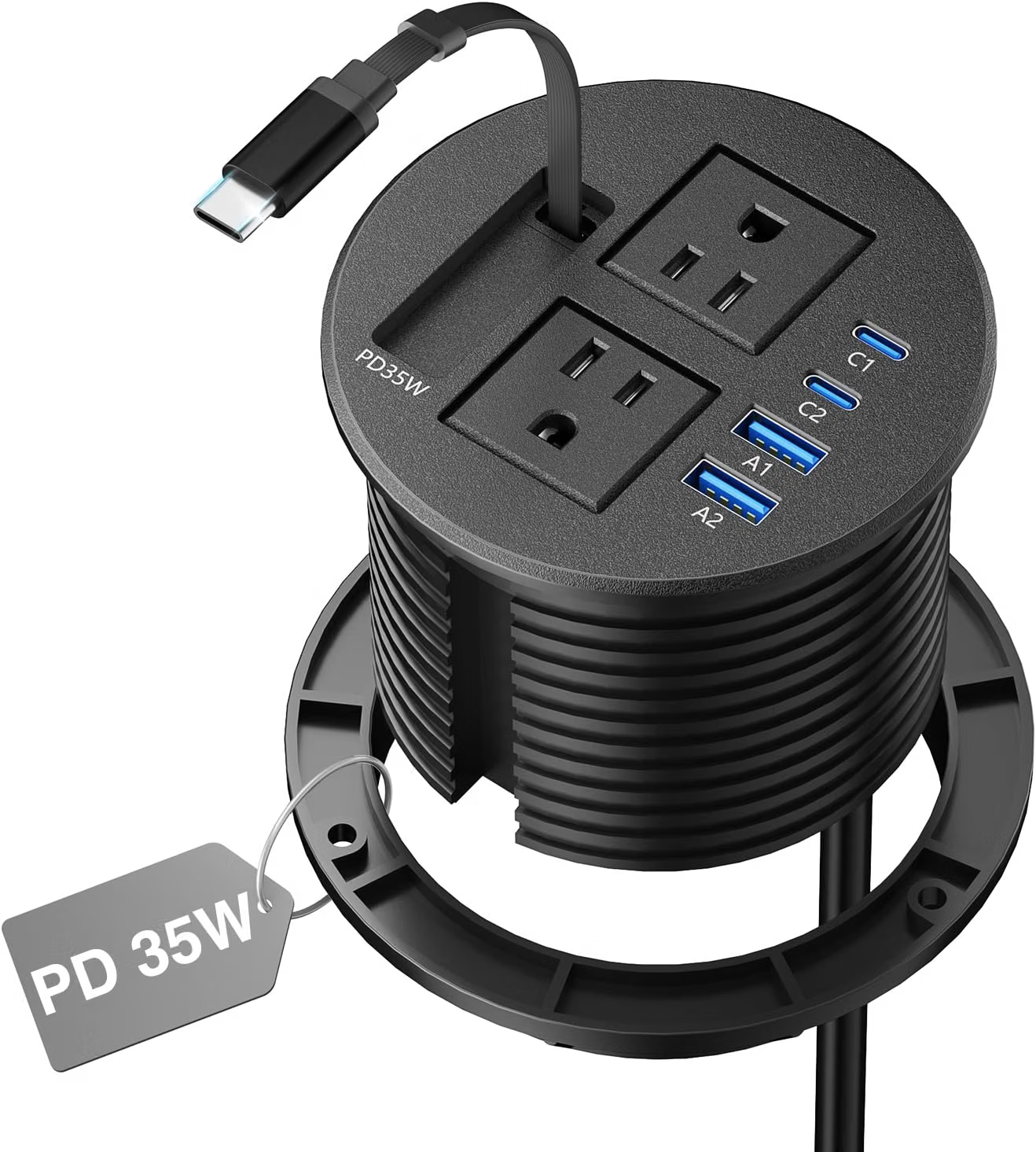
The 3 1/4-inch Desk Power Grommet with Retractable Cable is designed for this type of workspace. Its configuration combines two AC outlets with two USB-C charging ports and includes a retractable cable. The product is intended to fit into a suitable 3 1/4-inch desk opening, creating a more integrated approach to power and cable management.
This type of accessory can be useful in home offices, conference tables, study areas, reception desks, workstations, and other environments where convenient access to electricity is important.
However, a desk power grommet is more than a collection of outlets. Installation requirements, desk thickness, electrical load, USB-C charging capabilities, cable routing, and the existing power source all affect how it should be used.
Understanding these factors can help users determine whether a recessed or surface-integrated power solution makes sense for their workspace.
What Is a Desk Power Grommet?
A desk power grommet is an electrical accessory designed to be installed into a hole in a desk, tabletop, conference table, or similar surface.
Traditional cable grommets are often used simply to allow wires to pass through a desk. A power grommet combines that cable-management concept with electrical outlets and charging ports.
Instead of running a charging cable from a wall outlet across the entire desk, the user can have a power connection positioned directly within the desktop.
The 3 1/4-inch measurement is particularly important because the desk needs to have an appropriately sized opening for the product to be installed correctly.
This means that a power grommet is usually better suited to a planned workstation than a temporary power solution. Installation requires attention to the dimensions of the opening, the structure of the desk, and the routing of the power connection.
Key Features
Two AC Outlets
The product includes two AC outlets for compatible electrical devices.
These outlets can be useful for equipment that uses conventional power plugs rather than USB charging. Depending on the workstation, that could include a laptop power adapter, monitor, desk lamp, speakers, or another appropriate electronic device.
Positioning AC outlets directly on the desktop can make connections easier to reach.
For example, a user who frequently plugs and unplugs a laptop charger does not need to reach underneath the desk each time. The power connection can remain close to the normal working position.
As with any power-distribution product, however, the outlets should only be used within the electrical rating specified by the manufacturer. The number of available outlets does not determine how much total power the unit can safely supply.
Two USB-C Ports
The desk grommet also provides two USB-C charging ports.
USB-C has become common across modern consumer electronics, including smartphones, tablets, headphones, portable batteries, and some laptops.
Having USB-C ports directly on a desk can be useful when charging devices that are frequently used during the day.
Instead of using a separate wall adapter for every small USB-powered device, a compatible cable can be connected directly to the grommet.
The actual charging speed depends on the available USB-C power output, charging protocols, cable, and connected device. A USB-C connector alone does not guarantee a particular charging speed.
35W Charging Capability
The product configuration identifies a 35W charging capacity for its USB-C ports.
This amount of power can be relevant for charging a range of everyday mobile devices and accessories.
However, users should distinguish between total available USB-C power and the amount received by an individual connected device. When more than one USB-C port is being used, available power may be distributed according to the product’s charging design.
A phone, tablet, or other device may also regulate its own charging rate.
Anyone relying on the USB-C ports for a particular charging requirement should consult the manufacturer’s specifications and compare them with the device’s power needs.
Retractable Cable
One of the defining features is the retractable cable.
Cable management can be a persistent issue in workspaces. A long cable can hang below the desk when it is not needed, become tangled with other wires, or occupy valuable surface space.
A retractable design can help keep the cable more contained when it is not being used.
It can also make the connection point easier to manage in a shared workspace. Rather than leaving an extended cable across the table, the cable can be retracted when no longer required.
The mechanism should still be operated carefully. Pulling, twisting, or forcing a retractable cable beyond its intended range can place unnecessary stress on the internal mechanism.
3 1/4-Inch Desk Installation
The 3 1/4-inch specification describes the required desk opening associated with the product.
This is an important installation consideration.
A desk without a suitable opening may require drilling or modification. Before making any permanent changes to a desktop, users should verify the required hole diameter, available clearance, desk thickness compatibility, and the location of the opening.
The chosen position should also allow the power cable to route safely underneath the desk.
Once installed, the grommet becomes part of the desk itself rather than functioning as a loose accessory.
How It Can Be Used
Home Office Workstations
A home office often combines several electrical devices in a relatively small space.
A typical workstation might contain a laptop, monitor, smartphone, desk lamp, headphones, and other accessories.
The power grommet can provide a centralized location for some of these connections.
A laptop charger can use one AC outlet while a monitor uses another. Meanwhile, a phone and another USB-C device can use the charging ports.
This can make the desk easier to organize because the electrical connections are positioned within the desktop instead of being concentrated behind or underneath it.
Conference Tables
Conference rooms are another environment where tabletop power can be useful.
People attending a meeting may need to charge laptops, phones, or tablets. When a power connection is positioned near the center or another convenient area of the table, participants may not need to run charging cables toward a wall.
A retractable cable can also help keep the table clear when the connection is not being used.
For professional meeting spaces, installation should be planned carefully so that the grommet does not interfere with table structure or seating arrangements.
Study Desks
Students and home learners often use laptops and tablets for extended periods.
A desk-mounted power solution can place charging connections close to the user’s study area.
This can be especially helpful on larger desks where wall outlets may be several feet away.
The desk remains available for books, notebooks, and other study materials while charging connections are consolidated in one location.
Reception Desks
Reception areas often have computers, phones, lamps, and other equipment that require power.
A built-in power grommet can provide accessible charging connections without requiring loose power strips to sit visibly on the counter.
This can contribute to a more organized appearance while giving staff easier access to power.
Shared Workspaces
Shared workstations can benefit from easily accessible charging points.
A user may arrive with a laptop or phone and need power without disturbing other equipment.
A tabletop power grommet can provide a dedicated connection point that remains in the same location regardless of who is using the desk.
The retractable cable can be particularly useful where the workspace needs to switch between different activities.
Creative Work Areas
Designers, photographers, editors, and other creative professionals often use several electronic accessories.
A desk may include a monitor, laptop, speakers, external drives, phone, tablet, and other equipment.
Having power available directly on the work surface can make temporary connections more convenient.
At the same time, high-powered professional equipment should always be evaluated against the electrical specifications of the grommet rather than assuming that every device can be connected simultaneously.
Who It May Be Suitable For
Remote Professionals
People who work from home can use a desk power grommet as part of a more integrated workstation.
It can be particularly relevant to someone who frequently connects and disconnects mobile devices during the workday.
Students
Students working at home or in dedicated study areas may appreciate having USB-C charging close to their laptop or tablet.
The compact design can also help keep a small desk more organized.
Office Designers
Businesses planning conference rooms or shared desks may consider tabletop power as part of the overall furniture layout.
A built-in connection point can be more convenient than relying entirely on wall outlets.
People Building Custom Desks
A power grommet can be especially relevant during the design or renovation of a desk.
If the desktop is being built or modified anyway, incorporating a dedicated power opening can be easier than adapting an existing workspace later.
Users Focused on Cable Organization
People who want fewer loose cables on their desktop may find a recessed power solution useful.
The combination of integrated outlets and a retractable cable provides several ways to reduce visible cable clutter.
Important Things to Consider
The Desk Must Have a Suitable Opening
The 3 1/4-inch requirement should be checked carefully before installation.
The opening needs to be appropriate for the product and positioned in a location that provides sufficient clearance underneath.
A hole that is too small will not accommodate the grommet correctly, while an incorrectly positioned opening may interfere with desk supports or other components.
Permanent Installation Requires Planning
Unlike a portable power strip, a desk grommet is intended to become part of the furniture.
Before drilling into a desk, users should identify where the power source is located and determine how the cable will be routed.
The installation position should also be checked from both the top and underside of the desk.
Check Desk Construction
Not all desks are constructed the same way.
Solid wood, engineered wood, laminate, glass, metal, and composite tabletops can require different installation approaches.
A user should not assume that any tabletop can safely be modified.
For glass or specialized furniture, professional installation may be more appropriate.
Understand the 35W USB-C Rating
The stated 35W capacity should be interpreted according to the product’s charging specifications.
It does not necessarily mean that every connected device will receive 35W.
Charging depends on the device, cable, charging protocol, and available output.
If two USB-C devices are connected simultaneously, the available charging power may also be allocated between them depending on the design.
AC Power and USB Charging Are Different
The two AC outlets and two USB-C ports serve different purposes.
AC outlets are designed for compatible devices with standard plugs, while USB-C ports provide direct USB charging.
Users should select the appropriate connection for each device rather than relying on adapters unnecessarily.
For example, a phone that supports USB-C charging can connect directly to a compatible USB-C port, while a conventional monitor power adapter would normally use an AC outlet.
Do Not Exceed the Electrical Rating
The presence of multiple outlets can sometimes create the impression that many high-powered devices can be connected simultaneously.
That is not how electrical capacity works.
The total connected load should remain within the product’s stated rating.
High-power appliances such as heaters, cooking devices, or other demanding equipment should not be connected unless the manufacturer specifically indicates that they are appropriate for the product.
A desk power grommet is generally intended for electronics and workspace equipment, not as an unlimited replacement for a building’s electrical system.
Keep the Installation Dry
Because the product provides electrical connections directly on a desk, its location should be selected carefully.
Avoid placing it where spilled liquids are likely to enter the outlets or USB ports.
This is particularly important for desks near kitchen areas or where drinks are frequently placed.
A convenient location is not necessarily a safe one if it increases exposure to moisture.
Consider Cable Routing Under the Desk
The top of the desk is only one part of the installation.
The power cable needs to travel from the grommet to an appropriate power source underneath or beside the desk.
The cable should not be routed where chair wheels can repeatedly roll over it or where it can become a tripping hazard.
Cable clips or under-desk cable channels can help keep the connection organized.
Retractable Cables Need Care
Retractable mechanisms are convenient, but they contain moving components.
The cable should be extended and retracted smoothly rather than pulled abruptly.
If resistance is encountered, forcing the cable can potentially damage the mechanism.
Keeping the cable path clear can also make everyday use easier.
Heat and Ventilation
Electronic accessories should not be covered by papers, fabric, or other materials.
Although the grommet is installed into the desk, the surrounding area should remain clear enough to allow appropriate heat dissipation.
The underside of the desk should also remain reasonably accessible for inspection and cable management.
Comparing General Power Solutions
Traditional Power Strips
Traditional power strips are flexible and portable.
They can be placed on the floor, behind a desk, or on a tabletop without requiring permanent installation.
This makes them useful for renters, temporary workstations, and frequently changing layouts.
The trade-off is that they can occupy space or leave cables running across the floor.
Desktop Power Strips
Desktop power strips are designed to sit directly on a work surface.
They provide easy access to outlets and charging ports without requiring the user to reach underneath the desk.
However, they occupy some of the available desktop area.
Clamp-Mounted Power Strips
Clamp-mounted power strips attach to the edge of a desk or table.
They can provide accessible power while keeping the main body of the power strip away from the center of the work surface.
They are relatively flexible compared with permanently installed solutions but require a compatible table edge.
Desk Power Grommets
A desk power grommet is integrated into the tabletop.
This approach can provide a cleaner, built-in appearance and place electrical connections in a convenient location.
The main difference is installation. A suitable opening is required, and modifying an existing desk may not be practical for everyone.
Under-Desk Power Modules
Under-desk power systems keep electrical connections beneath the work surface.
They can be useful when users want the desktop itself to remain completely clear.
However, access may be less immediate than with a tabletop grommet.
Designing a Clean Charging Area
A desk power grommet can become the center of a simple charging station.
One useful approach is to identify the devices that need frequent access to power.
A smartphone and wireless accessories can use the USB-C connections, while larger equipment can use the AC outlets.
The retractable cable can remain stored when it is not required.
This arrangement helps separate frequently accessed connections from permanent equipment.
For example, a monitor and desk lamp may remain connected to AC outlets while a phone uses USB-C charging during the workday.
The goal is not to connect every device simply because connections are available. Instead, the power grommet should support a deliberate workstation layout.
Example: Home Office Setup
Consider a professional working at a desk with a laptop, external monitor, smartphone, and wireless headphones.
The monitor can connect to one AC outlet while the laptop charger uses the other.
The phone can connect to one USB-C port and the headphones to the second.
The retractable cable can be used when a temporary connection is needed and stored afterward.
This creates a centralized charging point without requiring multiple adapters to remain scattered across the desk.
The user can also route the main power cable toward the wall beneath the desk, keeping most of the electrical wiring away from the main working surface.
Example: Conference Room Setup
A conference table can benefit from power connections positioned where participants can reach them.
During a meeting, someone may need to charge a laptop or phone.
A tabletop power grommet can provide a nearby connection point.
When the meeting ends, retractable cable functionality can help reduce loose cables left across the table.
For a shared professional environment, the location of the grommet should be planned around seating positions, table supports, and other installed equipment.
Example: Student Study Area
A student might use a laptop for coursework while keeping a smartphone and wireless headphones nearby.
A desk grommet can provide a central charging location without requiring the student to reach behind furniture.
Books and notebooks can remain on the desk without a conventional power strip taking up additional surface area.
This can be particularly useful when the desk is already small.
Benefits of an Integrated Power Location
Easier Access
A power connection located directly on the desktop is naturally easier to reach than one hidden behind furniture.
Less Visible Wiring
The main power connection can be routed underneath the desk, leaving fewer long cables across the surface.
More Organized Workspaces
Consolidating several power connections in one location can make it easier to establish a consistent cable-management system.
Convenient USB-C Charging
Direct USB-C ports can reduce the need for separate charging adapters for compatible devices.
Retractable Cable Management
A retractable cable can be stored when it is not needed, helping keep temporary connections from becoming permanent clutter.
Limitations to Keep in Mind
No power accessory eliminates every cable-management problem.
A desk grommet still requires a connection to a suitable power source.
Devices with unusual plugs or specialized charging requirements may still need their own adapters.
The installation also means the location of the power connection is fixed once the grommet has been installed.
If a desk layout changes frequently, a portable power strip may provide more flexibility.
Similarly, users who need many AC outlets or additional USB ports may require a larger power-distribution solution.
Frequently Asked Questions
What is a desk power grommet?
A desk power grommet is an electrical module installed into a tabletop or desk opening. It provides convenient access to power and charging connections directly from the work surface.
What size opening does this product require?
The product is identified as a 3 1/4-inch desk power grommet. Users should verify the manufacturer’s exact installation dimensions before cutting or modifying a desk.
How many AC outlets does it have?
The configuration includes two AC outlets.
How many USB-C ports are included?
It provides two USB-C charging ports.
What does the 35W specification mean?
The product is specified with 35W charging capability for its USB-C charging function. Actual charging depends on the connected device, cable, charging protocol, and how available power is allocated.
Can it charge a smartphone?
Compatible smartphones can be charged through the USB-C ports using an appropriate cable.
Can it charge a tablet?
A compatible tablet can potentially be charged through USB-C, provided its charging requirements are supported by the available output.
Can it charge a laptop?
Whether the USB-C charging ports provide sufficient power for a particular laptop depends on the laptop’s charging requirements and the grommet’s specific output specifications. Users should not assume that a 35W USB-C output is sufficient for every laptop.
What is the retractable cable used for?
The retractable cable is designed to provide a convenient connection while allowing the cable to be pulled back when it is not needed. This can help reduce loose cable clutter.
Can the cable remain extended?
The cable can be used in its intended extended position, but users should follow the manufacturer’s instructions and avoid excessive pulling or bending.
Can this power grommet be installed in any desk?
Not necessarily. The desk must have suitable construction, enough space for the required opening, and compatible thickness and clearance.
Do I need to drill a hole?
If the desk does not already have an appropriately sized opening, installation may require creating one. The exact installation process should follow the manufacturer’s instructions.
Can it be installed in a conference table?
A suitable conference table can potentially accommodate a desk power grommet if its dimensions and construction meet the installation requirements.
Is it portable?
The power grommet itself is intended for installation into a desk or tabletop, so it is not as portable as a conventional power strip.
Does a desk grommet replace a wall outlet?
No. It still needs to receive electricity from an existing power source. It provides a convenient connection point but does not create a new electrical circuit.
Can I use both AC outlets at the same time?
Multiple outlets can be used simultaneously when the connected devices remain within the product’s rated electrical capacity.
Can both USB-C ports be used simultaneously?
The two USB-C ports are designed for charging compatible devices. When both are active, available power may be distributed according to the product’s charging design.
Does USB-C guarantee fast charging?
No. USB-C describes the connector. Charging speed depends on the power output, charging protocol, cable, and connected device.
Can it be used near drinks?
Electrical outlets and USB charging ports should be protected from liquids. A location where spills are likely should be avoided.
Is a desk power grommet better than a power strip?
They serve different purposes. A traditional power strip is portable and flexible, while a desk grommet is designed for an integrated, built-in power connection.
Is this suitable for a small desk?
It can be useful on a small desk because the power connections are integrated into the tabletop rather than requiring a conventional power strip to occupy additional surface space. The desk must still have sufficient room for installation.
What should I check before installation?
Check the required opening size, desk thickness, available clearance, installation location, cable-routing path, electrical rating, and manufacturer’s instructions.
Conclusion
The 3 1/4-inch Desk Power Grommet with Retractable Cable offers an integrated approach to everyday workspace power management.
Instead of placing a conventional power strip on the floor or directly on a desk, this type of accessory installs into the tabletop itself. The configuration combines two AC outlets with two USB-C charging ports and a retractable cable, creating a centralized connection point for compatible electronics.
For home offices, study desks, conference tables, reception areas, and shared workspaces, having power within the desktop can make frequently used connections easier to access. USB-C charging can also be convenient for modern mobile devices, while the retractable cable can help control temporary cable clutter.
The installation requirements are an important part of the decision. A 3 1/4-inch opening is required, and users should verify the exact dimensions and compatibility of their desk before making any modifications. The desk’s construction, thickness, underside clearance, and cable-routing path should all be considered.
Electrical capacity is equally important. The presence of two AC outlets and two USB-C ports does not mean that unlimited equipment can be connected simultaneously. Connected devices should remain within the product’s stated electrical limits, and the 35W USB-C capability should be considered in relation to the actual requirements of the devices being charged.
Compared with a conventional power strip, a desk grommet offers a more integrated solution. Compared with an under-desk module, it provides more direct access from the work surface. Its main strength is therefore the combination of accessibility, organization, and built-in installation.
For users designing or upgrading a workstation, the concept can be useful when power access needs to become part of the furniture layout rather than simply another accessory placed around it.
A well-planned installation can keep frequently used connections within reach while routing the main power cable underneath the desk, helping create a workspace that is easier to use and maintain.
Leave a Reply