Modern laptops, tablets, and smartphones continue to become thinner and more streamlined, but that design trend can sometimes come with a practical compromise: fewer physical ports.
A contemporary laptop may have USB-C connections but lack traditional USB-A ports, HDMI, or other interfaces that users still rely on every day. Someone working from home might need to connect a keyboard, mouse, external storage drive, and monitor at the same time. A student may want to connect a flash drive while displaying a presentation on a larger screen. A photographer could need a convenient way to connect accessories to a portable computer.
This is where a USB-C hub can become useful.
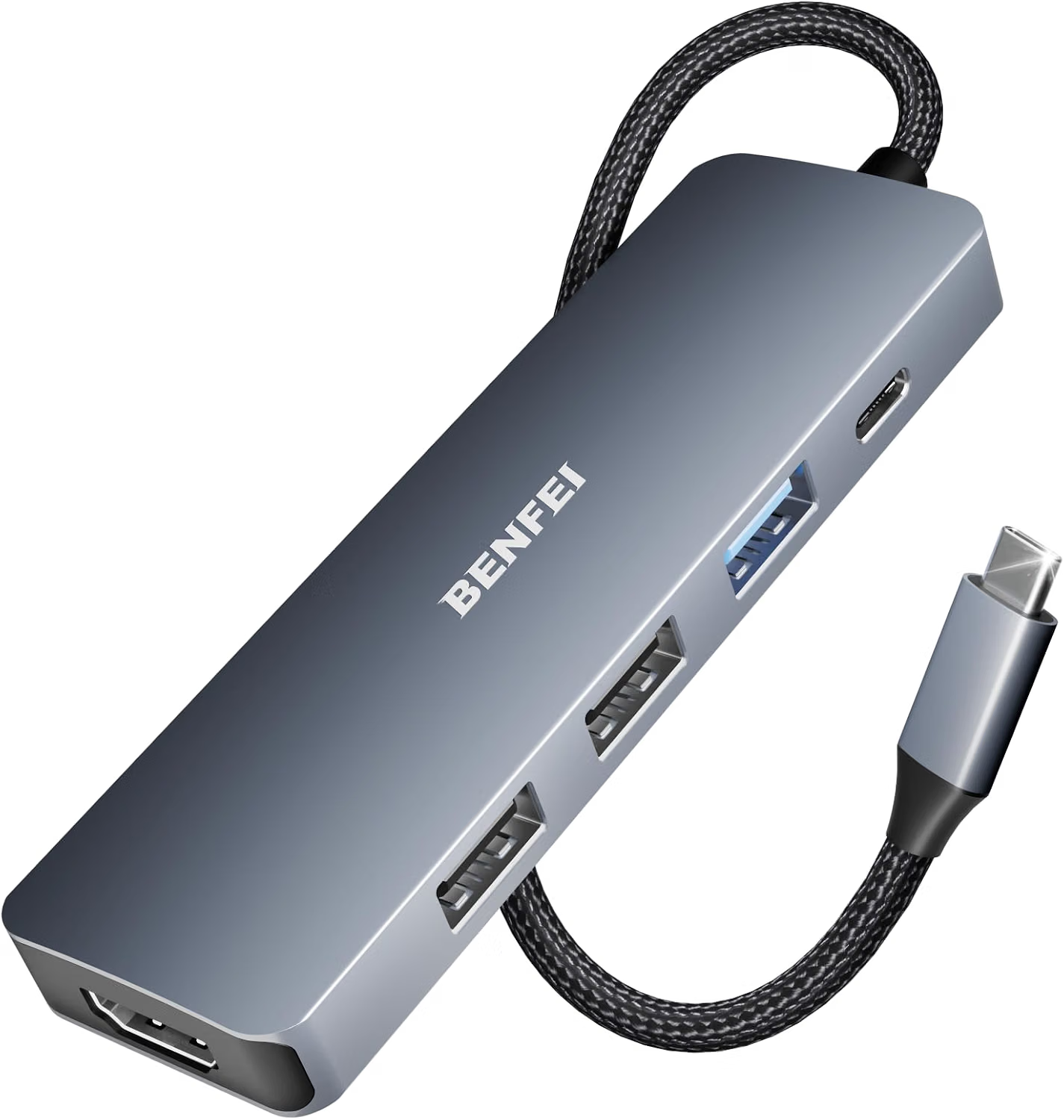
The BENFEI USB C Hub 5-in-1 is designed to expand the connectivity options of compatible USB-C devices. Its configuration combines a 4K HDMI output, 100W Power Delivery support, and three USB-A ports in a compact aluminum enclosure with a silicone cable.
Rather than thinking of a hub as simply an adapter with several sockets, it is more useful to understand it as a compact connection point between a computer or mobile device and several peripherals. The right hub can simplify a workspace, reduce the number of adapters needed, and make it easier to move between different environments.
At the same time, USB-C hubs have technical limitations that are important to understand. Video output depends on the host device’s capabilities, Power Delivery depends on the connected charger and device, and USB ports can have different data-transfer characteristics. Compatibility should therefore be considered before choosing a hub for a particular setup.
This guide explores the BENFEI 5-in-1 hub’s configuration, possible uses, compatibility considerations, and practical factors to keep in mind when integrating it into a modern workstation.
What Is a 5-in-1 USB-C Hub?
A USB-C hub allows one compatible USB-C port on a host device to connect to multiple peripherals through a single accessory.
In this case, the five connection functions are centered around:
- One 4K HDMI output
- One USB-C Power Delivery input supporting up to 100W
- Three USB-A ports
This combination addresses several common connectivity needs.
The HDMI connection can be used with a compatible external display, projector, or television. The USB-A ports can accommodate many traditional peripherals, including keyboards, mice, flash drives, card readers, and other USB accessories.
The Power Delivery connection is designed to allow compatible charging equipment to provide power to the host device while the hub is connected.
This arrangement can be especially useful for computers with a limited number of physical ports.
Key Features
4K HDMI Output
One of the central features of the hub is its HDMI output, which is designed to support 4K video output when used with compatible equipment.
An external display can make a significant difference in many workflows. A larger monitor can provide additional screen space for documents, spreadsheets, browser windows, creative applications, or communication tools.
A laptop connected to an external monitor can effectively become the center of a more traditional desktop workstation while still retaining the portability of the laptop itself.
The term “4K” describes a high-resolution video format, but users should not assume that every computer will automatically produce the same resolution or refresh rate.
The host device, operating system, graphics hardware, HDMI display, cable, and supported video modes all influence the final result.
For that reason, anyone purchasing a USB-C hub primarily for external displays should verify that their computer’s USB-C port supports the required video-output functionality.
100W Power Delivery Support
The hub also includes USB-C Power Delivery support with a stated capacity of up to 100W.
Power Delivery, commonly abbreviated as USB PD, is a USB-C charging technology that allows compatible devices and chargers to negotiate an appropriate power level.
For laptops and other higher-powered devices, this can be particularly useful. Instead of disconnecting the hub whenever the battery needs charging, a compatible charger can connect to the hub’s Power Delivery port while peripherals remain attached.
The “100W” specification refers to the maximum supported input power under the stated configuration. It does not necessarily mean that the connected laptop will receive exactly 100W.
Actual charging depends on the charger, cable, host device, hub power requirements, and the device’s own charging limits.
Users should therefore view 100W as a capability of the hub rather than a guarantee that every connected computer will charge at that level.
Three USB-A Ports
The three USB-A ports provide connections for a wide range of traditional USB accessories.
USB-A remains common despite the growing popularity of USB-C. Many keyboards, mice, flash drives, external storage devices, printers, microphones, webcams, and other accessories still use USB-A connectors.
A hub with three USB-A ports can make it easier to use those peripherals with a computer that primarily provides USB-C connectivity.
This can be particularly convenient when transitioning from an older collection of accessories to a newer laptop or tablet.
Silicone Cable
The product includes a silicone cable.
Cable construction can matter more than it initially appears. A cable that connects the hub to the host device experiences repeated bending, movement, and repositioning, particularly when the hub is used with a portable laptop.
Silicone can provide a flexible feel that may be convenient for compact workspaces and travel setups.
The cable is still a physical component and should be handled appropriately. Avoid unnecessary sharp bends, excessive pulling, or placing the cable where it can be pinched.
Aluminum Enclosure
The hub uses an aluminum case.
A compact metal enclosure can complement modern laptops and desk accessories while providing a solid housing for the internal electronics.
The enclosure also makes the hub relatively suitable for portable setups where users may want to carry it alongside a laptop or tablet.
As with any electronic accessory, the enclosure should not be considered a substitute for proper ventilation or safe handling. If the hub becomes warm during operation, it should be kept in an appropriate location with sufficient airflow.
How the BENFEI USB-C Hub Can Be Used
Building a Laptop Workstation
One common use is turning a laptop into a more conventional desktop workstation.
A user might connect:
- An external monitor through HDMI
- A keyboard through USB-A
- A mouse through USB-A
- An external storage device through another USB-A port
- A USB-C charger through the Power Delivery port
This creates a centralized connection point between the laptop and several accessories.
Instead of plugging every peripheral directly into the computer, the user can connect the accessories to the hub and then connect the hub to the laptop.
This can make switching between a desk setup and a mobile setup easier.
Connecting an External Monitor
A laptop screen is convenient for portability, but a larger monitor can be useful for longer work sessions.
For example, a user could keep a browser or reference document on the laptop while using the external monitor for a spreadsheet or creative application.
Another common arrangement is using the external display as the primary screen while keeping communication applications or reference material on the laptop.
The hub’s HDMI output provides the physical connection, but the computer must support external video through its USB-C interface.
Connecting Older USB Accessories
Many people have accumulated USB-A accessories over several years.
A keyboard that works perfectly does not necessarily need to be replaced simply because a new laptop has fewer USB-A ports. The same applies to a mouse, flash drive, printer, USB microphone, or external drive.
A USB-C hub can bridge the physical connector difference between newer host devices and older peripherals.
This can extend the useful life of existing accessories and reduce the need for a collection of individual dongles.
Working With External Storage
USB-A ports can also be useful for compatible external storage devices.
A portable drive or USB flash drive can provide a convenient way to move documents, photographs, videos, or other files between devices.
Transfer performance will depend on the specific USB port, storage device, cable, file sizes, and host system. Users working with large files should pay attention to the specifications of the individual components rather than assuming that every USB connection will operate at the same speed.
Presentations and Meetings
An HDMI-equipped hub can be useful in professional or educational environments.
A laptop can connect to a compatible projector or external display while other USB accessories remain connected.
For example, a presenter could use a wireless presentation receiver through USB-A while sending video to a projector through HDMI.
Before an important presentation, it is sensible to test the complete setup. Display compatibility, resolution settings, cables, and organizational equipment can all affect whether the connection works as expected.
Home Office Use
A home office can benefit from a centralized connection point.
A laptop may need access to a monitor, keyboard, mouse, storage device, webcam, and charging connection. With a suitable hub, several of these devices can remain connected to the hub while the laptop is attached through one USB-C connection.
When it is time to take the laptop elsewhere, the hub can remain at the desk with the peripherals connected.
Returning to the workstation then becomes a matter of reconnecting one cable.
Travel
Portability is another practical consideration.
A compact hub can be carried in a laptop bag alongside a computer, charger, and a few essential cables.
This can be useful for travelers who move between home, office, school, coworking spaces, and meeting rooms.
Instead of carrying separate adapters for HDMI and USB-A connections, one multi-port hub can consolidate several functions.
However, a hub is only useful when its capabilities match the equipment encountered during travel. Users who frequently work with SD cards, Ethernet, or additional USB-C data ports may require a different hub configuration.
Who It May Be Suitable For
MacBook Users
The product is described as compatible with MacBook Pro and MacBook Air models with suitable USB-C connectivity.
MacBook users often rely on USB-C accessories to expand their available connections. A hub can provide access to traditional USB-A peripherals and external HDMI displays without requiring multiple individual adapters.
Compatibility can vary between specific MacBook generations, so checking the exact computer model and port capabilities remains important.
iPad Users
Compatible iPad Pro devices can also benefit from USB-C expansion.
A tablet connected to a display, USB accessory, or other peripheral can become more flexible for certain workflows.
However, iPadOS may handle external displays and USB accessories differently from macOS or Windows. Users should verify that their particular iPad model and operating system support the intended setup.
iPhone 15 Pro and Pro Max Users
The product listing identifies compatibility with iPhone 15 Pro and iPhone 15 Pro Max.
USB-C on these devices provides greater accessory flexibility compared with older iPhone models using different physical connectors.
Potential applications can include connecting USB accessories or using compatible external-display workflows.
Because mobile operating systems impose their own restrictions, users should check the requirements of the particular accessory and application involved.
Windows Laptop Users
Windows laptops with compatible USB-C ports can also use USB-C hubs.
The listing specifically mentions systems such as Dell XPS and ThinkPad devices, but compatibility depends on the exact model and the functions supported by its USB-C port.
Some USB-C ports support charging and data only, while others additionally support video output. That distinction is particularly important if HDMI functionality is one of the main reasons for using the hub.
Students
Students frequently move between classrooms, libraries, dormitories, and home workspaces.
A portable USB-C hub can help them connect their laptop to existing USB accessories, displays, or classroom equipment without carrying several separate adapters.
Remote Professionals
People who regularly switch between mobile and desktop environments may appreciate the convenience of a centralized hub.
A workstation can remain connected to its monitor and accessories while the laptop is disconnected and taken elsewhere.
Important Things to Consider
Verify the USB-C Port’s Capabilities
Not all USB-C ports are identical.
The physical connector can support different combinations of data, video, and power functions depending on the device.
Before using the hub for HDMI output or charging, verify that the computer, tablet, or phone’s USB-C port supports the required functionality.
This is one of the most important compatibility checks.
Understand 100W Power Delivery
The 100W figure should be understood in context.
A compatible 100W charger does not necessarily mean the connected laptop will receive 100W. The computer determines how much power it can accept, and the charging system may negotiate a lower level.
The hub itself may also consume some power while operating its connected functions.
Users who need high-power laptop charging should check the complete power chain: charger, cable, hub, and computer.
HDMI Resolution Depends on the Entire Setup
Although the hub supports 4K HDMI output according to its product configuration, the actual display mode depends on the host device and display equipment.
The monitor or television must support the desired resolution, and the computer must be capable of sending the appropriate signal through its USB-C port.
Refresh rate and other display characteristics can also vary.
For demanding visual workflows, it is worth checking the detailed specifications rather than focusing only on the “4K” label.
USB Port Performance
USB-A ports are useful for a wide range of devices, but their performance depends on the specific USB implementation and connected hardware.
A basic keyboard and mouse require relatively little bandwidth. Large external storage transfers are much more demanding.
If file-transfer speed is important, users should verify the hub’s stated USB specifications and compare them with the capabilities of their storage device and computer.
Multiple Devices Share the Hub
A USB hub consolidates multiple connections through one host port.
That convenience means the connected peripherals ultimately share the hub’s connection to the computer.
If several bandwidth-intensive devices operate simultaneously, performance may differ from connecting each device through separate dedicated ports.
For ordinary office peripherals, this is often less significant. For demanding storage or media workflows, however, it is worth understanding.
Check the Required Cables
The hub provides connection interfaces, but users may still need appropriate cables for their particular devices.
For HDMI, the display connection requires a suitable HDMI cable. For Power Delivery, the charger and USB-C cable must support the required charging capability.
A hub cannot compensate for a cable or charger that lacks the necessary specifications.
Heat During Use
USB hubs can become warm during operation, particularly when several ports are active.
The aluminum enclosure may conduct heat away from internal components, but the hub should still be placed where air can circulate.
Avoid covering it with clothing, papers, or other objects.
Operating System Compatibility
Hardware compatibility and software compatibility are related but not identical.
A device may physically connect while the operating system determines how that connection behaves.
Windows, macOS, iPadOS, and other systems can differ in their support for external displays, storage devices, USB accessories, and power management.
Keeping the operating system updated and checking device-specific compatibility information can help avoid unexpected limitations.
Comparing General USB-C Hub Categories
USB-C hubs come in many configurations. Choosing the appropriate category depends on the devices and connections a person actually needs.
Basic USB-C to USB-A Adapters
A simple adapter usually converts one USB-C connection into one USB-A connection.
This can be appropriate for someone who only needs to connect a single traditional USB accessory.
Its simplicity can also make it compact and easy to carry.
The limitation is that it does not provide the broader connectivity of a multi-port hub.
Multi-Port USB-C Hubs
A multi-port hub combines several interfaces into one accessory.
The BENFEI 5-in-1 configuration falls into this category, combining HDMI, USB-A connectivity, and USB-C Power Delivery.
This type of hub can be useful for general productivity because it addresses several common needs without becoming as large as a full docking station.
USB-C Hubs With Card Readers
Some hubs add SD and microSD card slots.
These can be particularly useful for photographers, videographers, and other users who regularly transfer files from memory cards.
A hub without card readers may be preferable when those interfaces are unnecessary and a simpler configuration is sufficient.
USB-C Hubs With Ethernet
Ethernet-equipped hubs can provide wired network connectivity.
This can be relevant for offices, desktop workstations, or environments where wired networking is preferred.
For someone who primarily needs HDMI and USB-A connections, Ethernet may not be necessary.
Full Docking Stations
Docking stations generally provide a broader collection of ports and may support more extensive desktop setups.
They can be useful for users who connect multiple displays, Ethernet, external storage, audio equipment, and other peripherals.
The trade-off is typically a larger physical footprint and a more stationary setup.
A compact five-port hub serves a different purpose: portable expansion with a focus on common everyday connections.
Organizing a USB-C Workstation
A USB-C hub works most effectively when the workspace is organized around the devices that are actually used.
Start by identifying the peripherals that remain at the desk permanently.
For example, a monitor, keyboard, mouse, and external storage drive can remain connected to the hub. The laptop can then connect to the hub through the single USB-C host connection.
The charger can connect to the hub’s Power Delivery input when the setup supports charging through the hub.
When leaving the desk, disconnecting the host cable allows the laptop to become mobile without unplugging every peripheral individually.
This arrangement can also reduce the number of cables that need to be handled every time the laptop moves.
Using the Hub for a Dual-Environment Setup
One of the practical advantages of a portable hub is the ability to create two different environments around the same computer.
At home, the laptop can connect to a monitor and traditional USB peripherals.
At work or school, the same hub can be carried in the laptop bag and connected to a projector, display, keyboard, or USB accessory.
This can make a USB-C hub useful for people whose work does not happen in a single location.
The important point is to think of the hub as part of a larger system rather than as a standalone solution. The computer, display, charger, cables, and peripherals all contribute to the final experience.
Frequently Asked Questions
What does a 5-in-1 USB-C hub do?
A 5-in-1 USB-C hub expands one compatible USB-C connection into multiple interfaces. This model combines a 4K HDMI output, USB-C Power Delivery input, and three USB-A ports.
Does the hub support 4K?
The product is designed to support 4K HDMI output. Actual resolution and display performance depend on the host device, display, cable, and supported video modes.
Can the hub charge a laptop?
It supports USB-C Power Delivery with a stated capability of up to 100W. The actual charging power depends on the charger, host device, cable, and the device’s charging requirements.
Does a 100W rating mean my laptop receives 100W?
Not necessarily. The 100W specification describes the hub’s supported Power Delivery input capability. A laptop may negotiate a lower charging level based on its own requirements and limitations.
How many USB-A ports are available?
The hub provides three USB-A ports.
Can I connect a keyboard and mouse at the same time?
Compatible USB keyboards and mice can generally be connected through separate USB-A ports, assuming the host device and operating system support the peripherals.
Can I connect an external monitor?
The hub includes an HDMI output intended for compatible external displays. The host device must support video output through its USB-C connection.
Is it compatible with MacBook Air?
The product is listed as compatible with MacBook Air models with appropriate USB-C connectivity. The exact model and port capabilities should be verified before use.
Can it work with a MacBook Pro?
The product is listed for MacBook Pro compatibility. As with other USB-C devices, exact functionality depends on the particular MacBook model and its supported ports.
Can it be used with an iPad Pro?
The product listing identifies iPad Pro compatibility. Users should verify the exact iPad model and confirm that its operating system supports the intended peripherals or external-display configuration.
Does it work with Windows laptops?
It can be used with compatible Windows laptops, including supported models from manufacturers such as Dell and Lenovo. The exact USB-C port specifications should be checked for video, data, and charging support.
Can I use the hub with an iPhone?
The product listing identifies iPhone 15 Pro and iPhone 15 Pro Max among compatible devices. The available functionality can depend on the phone’s operating system and the connected peripheral.
Do I need a separate HDMI cable?
Yes, connecting an external HDMI display generally requires an appropriate HDMI cable unless one is already included as part of the display or setup.
Can several USB devices be connected simultaneously?
The hub provides three USB-A ports, allowing several compatible USB devices to be connected at once. Their combined behavior depends on the host device and the hub’s available resources.
Is a USB-C hub the same as a docking station?
Not exactly. A USB-C hub is generally smaller and focused on expanding common connections. A docking station often provides more ports and is designed for more extensive desktop setups.
Can I use the hub while charging my laptop?
The Power Delivery design is intended to allow charging through the hub while compatible peripherals are connected. The charger and host device must support the required USB-C Power Delivery configuration.
Why might HDMI not work even though the hub supports HDMI?
One possible reason is that the host device’s USB-C port does not support video output. Other factors can include the HDMI cable, display, operating system, resolution settings, or compatibility between devices.
Is aluminum useful for a USB-C hub?
An aluminum enclosure provides a compact metal housing and can complement modern portable electronics. It should still be used with appropriate ventilation and handling.
Is this type of hub useful for travel?
A compact multi-port hub can be convenient for travel because it combines several common connections into one accessory. Whether it is suitable for a particular trip depends on the ports required by the traveler’s equipment.
Conclusion
The BENFEI USB C Hub 5-in-1 is designed to address a common challenge created by modern computing devices: the need to connect traditional peripherals and external displays to computers and mobile devices with increasingly limited physical ports.
Its configuration brings together a 4K HDMI output, three USB-A ports, and USB-C Power Delivery support in a compact aluminum enclosure with a silicone cable. This combination can be useful for home offices, study areas, presentations, travel, and portable workstation setups.
The HDMI connection provides a way to connect compatible external displays, while the USB-A ports can accommodate many familiar accessories such as keyboards, mice, storage devices, and other peripherals. The USB-C Power Delivery input can also help maintain a laptop’s charge while the hub remains connected, provided the charger, cable, and host device support the necessary charging configuration.
However, understanding USB-C compatibility is essential. Not every USB-C port supports video output, charging, or the same data capabilities. Similarly, a 100W Power Delivery specification does not mean every laptop will charge at 100W, and 4K HDMI support does not guarantee that every computer and display combination will operate at every possible 4K refresh rate.
For users considering a USB-C hub, the most useful approach is to start with the devices they already own and identify the connections they actually need. A compact five-in-one design can be a practical middle ground between a single-purpose adapter and a larger docking station.
With the right host device, cables, charger, and peripherals, a hub like this can help create a more organized and flexible connection system while keeping the laptop or tablet itself relatively uncluttered.
Leave a Reply