Modern workspaces often require more electrical connections than the average desk or nightstand was designed to provide. A laptop may need power, a phone may need charging, wireless earbuds may need a quick connection, and other everyday electronics can compete for the same limited wall outlet. When cables begin stretching across a tabletop or collecting around a power adapter, even a well-organized room can quickly feel cluttered.
An edge-mounted power strip offers a different approach to managing these connections. Instead of simply sitting on the floor or occupying valuable space on top of a desk, a tabletop clamp-style design can attach to the edge of a suitable surface. This places electrical outlets and charging ports closer to where devices are actually being used.
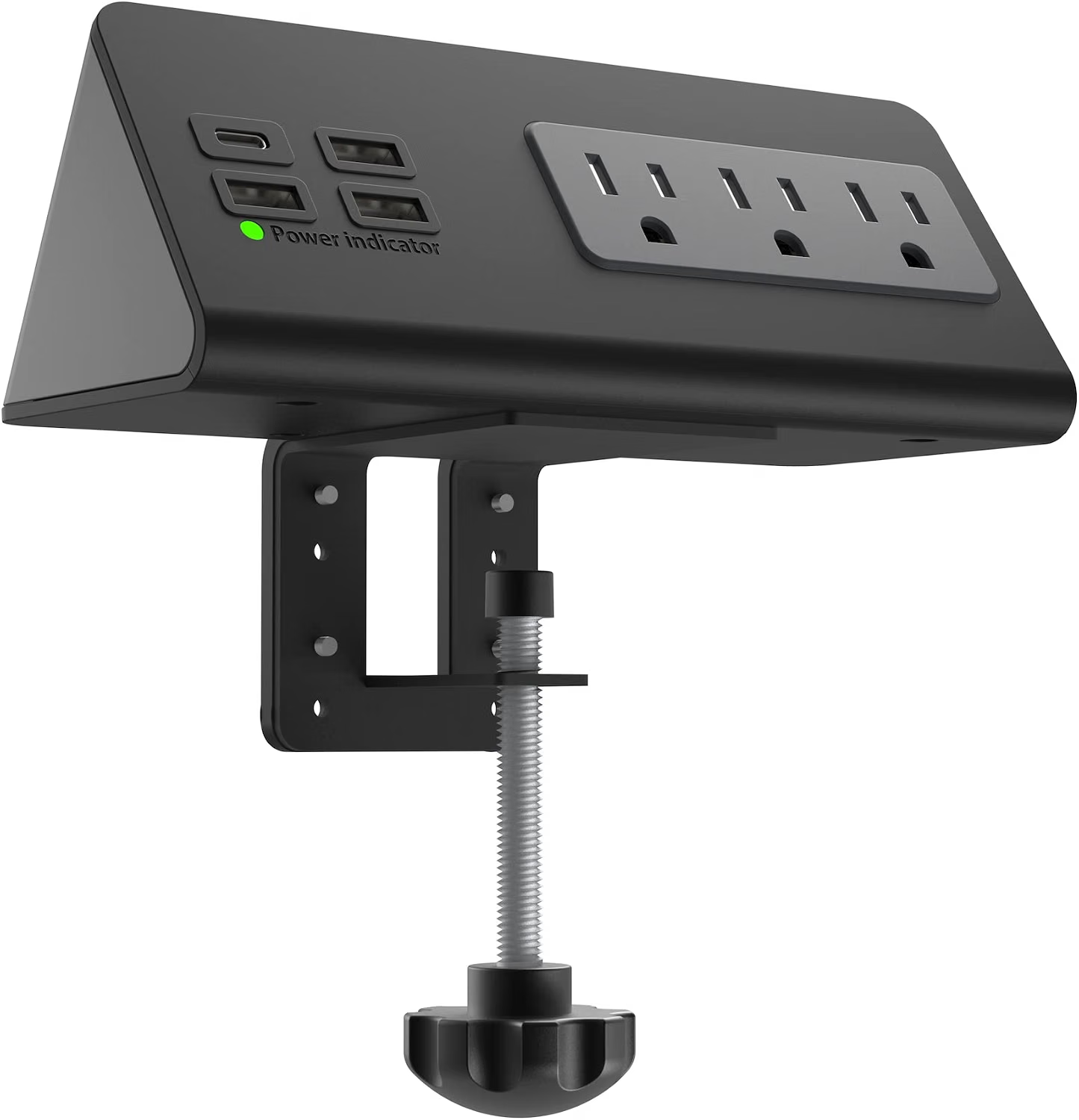
The Nightstand Edge Mount Power Strip with USB-C Ports is designed around this concept. It combines three AC outlets with four USB charging ports in a compact tabletop format and uses an edge-mounting mechanism intended for desks, nightstands, tables, and similar surfaces. The design can be particularly relevant in environments where access to a convenient wall outlet is limited or where keeping charging connections within easy reach is important.
This type of accessory is not simply about adding more sockets. Its usefulness depends on how the workspace is arranged, what devices need to be connected, the thickness and construction of the furniture, and the electrical requirements of the equipment being powered.
Understanding these factors can help determine whether a clamp-mounted power strip fits a particular setup.
What Is an Edge-Mounted Power Strip?
A conventional power strip normally rests on a floor, shelf, or tabletop. While this arrangement is familiar, it can create several practical problems. A strip placed on the floor may be difficult to reach, while one sitting on a desk can consume part of the working surface.
An edge-mounted model takes another approach. It is designed to attach to the side or edge of a compatible surface using a clamp or mounting mechanism. Once positioned correctly, the outlets and USB ports remain close to the user without requiring the entire power strip to occupy the middle of the workspace.
This arrangement can be useful for desks where computers, monitors, phones, lamps, and accessories are regularly connected.
It can also make sense beside a bed or nightstand. Rather than reaching behind furniture for a wall socket, users may have access to the charging connections from the side of the furniture.
The concept is especially relevant to compact spaces. Dorm rooms, small home offices, shared work areas, hotel rooms, and multifunctional tables often have limited space and a relatively small number of conveniently positioned electrical outlets.
Key Features
Three AC Outlets
The unit provides three standard AC outlets for connecting compatible electrical equipment.
These outlets can be useful for devices that require conventional power plugs rather than USB charging. Depending on the workspace, that could include a desk lamp, laptop power adapter, monitor, small fan, or other household electronics.
Having multiple AC outlets in one accessible location can reduce the need to repeatedly move plugs between a wall socket and other equipment.
However, having three outlets does not mean that every connected device should automatically be operated at the maximum possible load. Electrical accessories should always be used within their rated electrical capacity, and devices with high power requirements should be considered carefully before being connected.
Four USB Charging Ports
In addition to the AC outlets, the design includes four USB charging ports.
USB charging can be convenient for everyday electronics such as smartphones, wireless earbuds, rechargeable accessories, and other USB-powered devices.
Having several USB ports in one location can also reduce the number of individual wall adapters needed around a desk or bedside area. Instead of using a separate AC adapter for every small USB-powered device, compatible equipment can potentially connect directly to the charging ports.
The exact charging behavior depends on the connected device, cable, charging protocol, and available power from the power strip. USB-C and other USB connections should not automatically be assumed to provide identical charging performance.
USB-C Connectivity
USB-C has become increasingly common across modern consumer electronics.
Phones, tablets, laptops, headphones, portable batteries, gaming accessories, and other devices may use USB-C for charging or power delivery. For this reason, having USB-C connectivity in a desk power accessory can make a setup more convenient for people who regularly use newer devices.
It is important, however, to distinguish between a USB-C port and a particular USB-C charging standard. USB-C describes the physical connector, while charging capabilities can vary between products.
Users who require specific high-power charging should check the manufacturer’s stated specifications and compare them with the requirements of the device being charged.
Clamp-Based Tabletop Installation
One of the most distinctive elements of this power strip is its edge-mounting format.
A clamp allows the power strip to attach to the edge of a suitable desk, table, or nightstand. This can free up some tabletop space while keeping the electrical connections accessible.
The mounting method may be particularly helpful when the available wall outlet is positioned inconveniently. Instead of placing a power strip several feet away, the user can position the outlets closer to the working area, provided the furniture is compatible with the mounting mechanism.
Before installation, the surface should be checked for compatibility, stability, thickness, and construction.
Compact Workspace Organization
Electrical accessories can contribute significantly to desk clutter. Power adapters, charging cables, extension cords, and plugs can quickly create an untidy area.
A mounted power strip provides a central location for many of these connections. Because it attaches to the edge of the furniture, the surface itself can remain more available for books, a keyboard, a notebook, monitor accessories, or other items.
This does not eliminate cable management on its own, but it can make cable organization easier.
How It Can Be Used
Home Office Desks
A home office is one of the most natural environments for a tabletop-mounted power strip.
A typical desk may contain a computer, monitor, phone, desk lamp, speakers, headphones, and several USB-powered accessories. Instead of placing a power strip behind the desk or under the table, an edge-mounted model can provide connections closer to the user’s normal working position.
This can be particularly useful for temporary workstations where drilling or permanent electrical modifications are not desirable.
The clamp design also makes the accessory suitable for situations where the desk layout changes regularly.
Nightstands and Bedside Tables
A bedside table often has limited surface area, yet modern bedrooms can contain several electronic devices.
A phone may be charging overnight while a smartwatch, wireless earbuds, reading light, or other USB-powered device needs access to power.
A power strip attached near the edge of a suitable nightstand can place these connections within easier reach while keeping some of the tabletop free.
Cable length should still be considered. A charging cable that is too short may not reach comfortably even if the power outlet is positioned nearby.
Dormitory Rooms
Dormitory rooms can present unique space and power challenges. Students may have a desk, bed, small table, laptop, phone, lamp, and several personal electronics sharing a relatively compact area.
A tabletop power solution can help consolidate electrical connections without requiring additional permanent fixtures.
Because dormitory furniture varies considerably, students should check whether the clamp mechanism is compatible with the supplied desk or table. Dormitory rules may also place restrictions on certain electrical accessories, so institutional guidelines should be checked before use.
Hotel Rooms
Travelers sometimes encounter hotel rooms where the available outlets are inconveniently positioned.
A compact power accessory can provide a centralized charging location for phones and other personal electronics.
An edge-mounted design may be useful when a suitable table or nightstand is available. Nevertheless, hotel furniture should be treated carefully, and the clamp should only be attached to a surface that can accommodate it without damage.
Travelers should also consider the electrical standards of the country where the product will be used. A product designed for one electrical system may not be appropriate for another without suitable compatibility.
Shared Workspaces
In a shared workspace, access to convenient outlets can be limited.
A desk-mounted power strip can provide a practical charging point for a personal workstation when permitted by the workspace’s electrical and safety policies.
Its relatively accessible position can also make it easier to connect and disconnect devices during the day.
Who It May Be Suitable For
This type of power accessory may be relevant to several groups of users.
Remote Workers
People who work from home often build workstations around existing furniture rather than purpose-built office desks. An edge-mounted power strip can provide an additional way to organize connections without taking up the center of the desk.
Students
Students working with laptops, phones, tablets, lamps, and other electronics may benefit from having several charging connections concentrated around a desk.
The compact nature of a mounted design can also be useful where workspace is limited.
People With Small Work Areas
Not every home has enough room for a large desk. A compact table, kitchen counter, or small workstation may need to perform several functions.
When every square inch matters, moving the power strip toward the edge can help preserve usable tabletop space.
Frequent Device Users
Anyone who regularly switches between multiple USB-powered devices may appreciate having several charging connections in one location.
The convenience comes from accessibility rather than from eliminating the need for proper cable management or electrical safety practices.
Important Things to Consider
Check Furniture Compatibility
The clamp is an important part of the product’s design, so furniture compatibility should be considered before installation.
A tabletop may be too thick, too thin, unusually shaped, or constructed in a way that prevents the clamp from securing properly.
The edge should provide enough room for the mounting mechanism to grip securely without interfering with drawers, brackets, or other furniture components.
Consider Electrical Load
A power strip should not be treated as an unlimited source of electricity.
The total electrical load of connected AC equipment should remain within the product’s rated capacity. High-power appliances can require substantially more electricity than ordinary electronics such as phones or small accessories.
Before connecting multiple devices, check their power requirements and the power strip’s stated electrical specifications.
USB Charging Is Not Identical Across Devices
Four USB ports can sound straightforward, but charging speed depends on more than the number of ports.
Factors can include the charging protocol, the power available through each port, cable quality, and the device itself.
A phone that supports a particular fast-charging technology may not charge at its maximum supported rate through every USB connection.
For people with specific charging requirements, the manufacturer’s detailed specifications should be consulted before making assumptions about performance.
Cable Management Still Matters
A mounted power strip can reduce clutter, but cables still need to be arranged properly.
Long cables can hang below the desk or become tangled with chair wheels and other objects. Short cables may place unnecessary strain on charging ports.
Routing cables toward the rear or underside of the desk can create a cleaner setup. Cable clips, sleeves, or simple routing solutions can also help keep connections organized.
Avoid Excessive Mechanical Stress
Because the product attaches to furniture rather than simply resting on a surface, the mounting area should remain stable.
Users should avoid pulling aggressively on connected cables or allowing heavy adapters to hang in a way that places unnecessary stress on the power strip or clamp.
The mounted position is intended to improve accessibility, not to serve as a handle or support point.
Keep Electrical Connections Dry
Like other mains-powered electrical accessories, a power strip should be kept away from water and excessive moisture.
This is particularly important when considering locations near kitchen counters, bathrooms, sinks, or beverages.
A nightstand may seem relatively safe, but drinks and charging electronics can still create avoidable risks. Electrical equipment should always be used according to the manufacturer’s safety instructions.
Consider Heat and Ventilation
Electrical accessories should have adequate ventilation and should not be covered by clothing, bedding, papers, or other materials.
A power strip positioned beneath a pile of objects may have less opportunity to dissipate heat.
Keeping the surrounding area clear can support safer everyday operation.
Comparing General Power Strip Categories
Different power solutions are designed for different environments. Understanding the categories can make the choice easier.
Traditional Floor Power Strips
Traditional power strips are simple and flexible. They can be placed on the floor or another flat surface and moved when necessary.
Their main advantage is versatility. They do not require a suitable table edge.
On the other hand, they may be harder to reach when positioned underneath a desk and can contribute to floor-level cable clutter.
Desktop Power Strips
Desktop models generally sit directly on the surface.
They can provide convenient access to outlets and charging ports, particularly when the user wants the power strip visible and easy to reach.
The trade-off is that the power strip occupies part of the workspace.
Wall-Mounted Power Solutions
Wall-mounted electrical products can provide a more permanent arrangement.
They may work well in dedicated offices or work areas where the location is unlikely to change. Installation requirements, however, can be more involved than those of a clamp-mounted accessory.
Edge-Mounted Power Strips
Edge-mounted products occupy a middle ground.
They can offer some of the accessibility of a desktop power strip while preserving more usable tabletop space. They can also be repositioned more easily than permanently installed electrical hardware, depending on the mounting design.
The main limitation is furniture compatibility. A suitable edge is necessary for secure installation.
Creating a More Organized Charging Station
A power strip becomes more useful when combined with a thoughtful workstation layout.
Start by identifying which devices need power regularly and which are only connected occasionally. Frequently used devices should be positioned close to the accessible outlets.
USB-powered devices can be grouped around the USB ports, while equipment using standard AC adapters can use the AC outlets.
Cable lengths should be matched to device locations whenever possible. Excess cable can be routed along the back edge of the desk instead of crossing the primary work surface.
Another useful approach is to avoid connecting unnecessary devices simply because an outlet is available. A cleaner electrical setup is easier to understand and maintain.
For bedside use, cables should be positioned so that they do not become tangled around bedding or create a snagging hazard.
Practical Setup Example for a Home Office
Imagine a small desk with a laptop, monitor, phone, wireless earbuds, and desk lamp.
The laptop and monitor may use the AC outlets, while the phone and earbuds can connect through USB charging ports. The power strip can be positioned along the desk edge so that the user does not have to reach behind the monitor every time a device needs to be connected.
The result is not necessarily a completely cable-free workspace. Instead, the objective is to create a more logical connection point.
The same principle can be applied to a study desk, gaming area, or compact creative workstation.
Practical Setup Example for a Nightstand
A bedside setup might include a smartphone, smartwatch, wireless earbuds, reading lamp, and another small electronic device.
Rather than having multiple charging adapters spread around the nightstand, a centralized power location can help organize these connections.
The user can reserve the AC outlets for devices that require conventional plugs and use the USB connections for compatible rechargeable electronics.
The nightstand should remain sufficiently clear around the power strip, and cables should be routed so they do not interfere with movement around the bed.
Why USB-C Matters in Modern Workspaces
USB-C has become an increasingly common connection format because it can support charging and data functions across a wide range of devices.
Its reversible connector design also makes plugging in devices more convenient than older USB connector styles.
For a modern workspace, USB-C connectivity can reduce dependence on separate charging adapters for compatible devices.
However, users should remember that connector shape and charging capability are different concepts. Two USB-C ports can have different electrical characteristics.
Anyone purchasing a power accessory specifically for fast charging should verify the advertised output specifications and compare them with the requirements of their devices.
Frequently Asked Questions
What is a nightstand edge-mount power strip?
It is a power strip designed to attach to the edge of compatible furniture such as a nightstand, desk, or table. The design combines traditional AC outlets with USB charging connections while keeping the power strip accessible from the edge of the furniture.
How many AC outlets does this model provide?
The product is designed with three AC outlets.
How many USB charging ports are included?
It provides four USB charging ports, including USB-C connectivity as part of its charging configuration.
Can it be used on a desk?
Yes, the design is intended for suitable tabletop surfaces such as desks and tables. The furniture should be compatible with the clamp mechanism before installation.
Can it be used on a nightstand?
A suitable nightstand can be an appropriate application when the edge and construction of the furniture can securely accommodate the mounting mechanism.
Does USB-C automatically mean fast charging?
No. USB-C identifies the connector type, but charging speed depends on the electrical output, charging protocol, cable, and connected device.
Can all of the outlets be used simultaneously?
Multiple outlets may be used at the same time as long as the total electrical load remains within the product’s rated capacity and the connected devices are appropriate for the available power.
Is a clamp-mounted power strip better than a traditional power strip?
The two designs solve somewhat different problems. A traditional power strip can be more flexible in placement, while an edge-mounted model is designed to keep connections accessible and reduce the amount of tabletop space occupied by the power strip itself.
Will it work with every desk?
Not necessarily. Furniture dimensions and construction vary. The clamp needs a compatible edge and sufficient clearance to attach securely.
Can it replace a wall outlet?
No. A power strip distributes electricity from an existing electrical connection; it does not create a new independent electrical circuit.
Is it useful for a dorm room?
It can be useful in a dormitory setting where compatible furniture and electrical policies permit its use. Students should check their residence’s rules before installing or using electrical accessories.
Can it be used in a hotel?
It may be useful on a suitable hotel nightstand or table, but users should avoid attaching accessories to furniture in a way that could cause damage. Electrical compatibility should also be considered when traveling internationally.
Does a mounted power strip eliminate cable clutter?
It can help reduce clutter by moving the power connection to a more accessible location, but cable organization is still necessary. Proper cable routing remains an important part of maintaining a tidy workstation.
What should I check before using it?
Check the furniture compatibility, electrical rating, connected-device power requirements, USB output specifications, and manufacturer’s safety instructions. Make sure the unit is securely mounted and kept away from water and excessive heat.
Conclusion
The Nightstand Edge Mount Power Strip with USB-C Ports represents a practical approach to a common modern problem: too many devices competing for convenient access to power.
Its combination of three AC outlets and four USB charging ports gives users several connection options for everyday electronics, while the edge-mounted format is intended to keep those connections accessible without requiring the power strip to occupy the center of a desk or nightstand.
This design can be relevant in home offices, student rooms, bedrooms, hotel rooms, and compact workspaces. It can be particularly useful where tabletop space is limited and frequently used charging connections need to remain within easy reach.
At the same time, a few considerations should not be overlooked. Furniture must be compatible with the clamp, connected equipment must remain within the appropriate electrical limits, and USB-C charging capabilities should be understood based on actual output specifications rather than the connector type alone.
Good cable management, adequate ventilation, protection from moisture, and careful attention to electrical load are also important parts of using any power-distribution accessory responsibly.
For someone organizing a modern workspace, the main value of an edge-mounted power strip is therefore its combination of accessibility and space-conscious design. Rather than treating power management as an afterthought, it can become part of the overall organization of the desk or bedside area.
Leave a Reply